How BootApp was built: a full site on Cloudflare's free tier
Accounts, an admin area, articles, a contact inbox and two-factor login, built in a day on Cloudflare Workers and D1 with no servers.
BootApp is the site you're reading. This case study explains how it was built, what it runs on, and what it costs.
The goal
We wanted a professional site for workflow and marketing content, with:
- user accounts and a secure admin area
- articles that admins can write and publish from the browser
- a contact form with replies
- simple, low running costs and nothing to patch or maintain
The setup
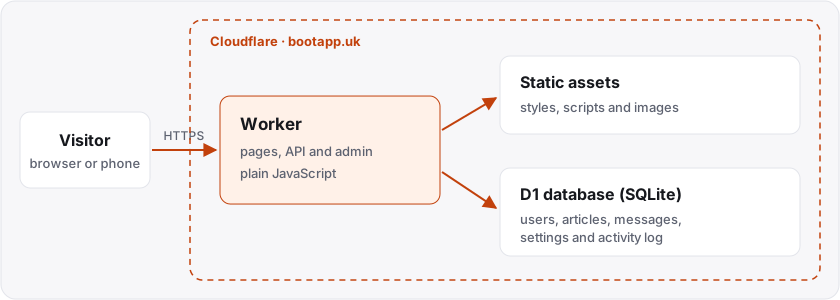
Everything runs on Cloudflare:
- One Worker builds the pages, answers the API and guards the admin area.
- Static assets (styles, scripts and images) are served from Cloudflare's network.
- A D1 database stores users, articles, messages, settings and an activity log.
- The domain is registered with Cloudflare, so DNS and HTTPS were set up automatically.
There's no separate server, no container and no Git-based pipeline. Changes are made in a local folder and published with wrangler deploy. Cloudflare keeps every previous version, so a bad change can be rolled back with one command.
How it was built
The site was built in stages, with an AI coding assistant (Claude Code) doing the work through Cloudflare's wrangler command-line tool, and a person approving each step, especially anything that changed DNS or cost money.
- Accounts first. Sign-up, log-in and log-out, with salted password hashes and secure, HttpOnly session cookies.
- Connect the domain. The Worker was attached to bootapp.uk as a custom domain.
- Admin. A dashboard with charts, user management and an activity log of logins, sign-ups and changes.
- Content and contact. A Markdown editor for articles, a contact inbox, and site-wide settings.
- Security. Rate limiting on logins and forms, two-factor login with an authenticator app, and security headers on every page.
Each stage was tested on a local copy first, then deployed and checked on the live site.
Lessons learned
- Database changes go first. Once, a deploy went out while a database change failed, and logins errored for a minute or two. Since then, the deploy only runs once the change is confirmed.
- Approximate tools have limits. Cloudflare's built-in rate limiter is approximate by design, so login limits use a small exact counter in the database instead.
- Small is fast. A hand-written stylesheet and no front-end framework keep pages light and quick on phones.
What it costs
Workers, D1 and static assets are all within Cloudflare's free limits at this size. The only fixed cost is the yearly domain registration.
Want something similar?
If you'd like a site or workflow like this for your own product, tell us about it.