Deploy a website on Cloudflare Workers, step by step
Go from an empty folder to a live site on your own domain, with a database, previews and one-command rollbacks.
Cloudflare Workers can run a whole website, pages, API and database, without a server to look after. This guide takes you from an empty folder to a live site on your own domain.
What you need
- A free Cloudflare account
- Node.js (the LTS version) installed on your computer
- A domain on Cloudflare, if you want your own address (optional at first)
1. Create the project
Run this in a terminal and choose a Worker with static assets when asked:
npm create cloudflare@latest my-siteYou get a folder with a wrangler.jsonc settings file, a src/index.js file for your server code, and a public/ folder for HTML, CSS and images.
2. Log in to Cloudflare
npx wrangler loginA browser window opens. Click Allow and Wrangler can now deploy to your account.
3. Preview your changes
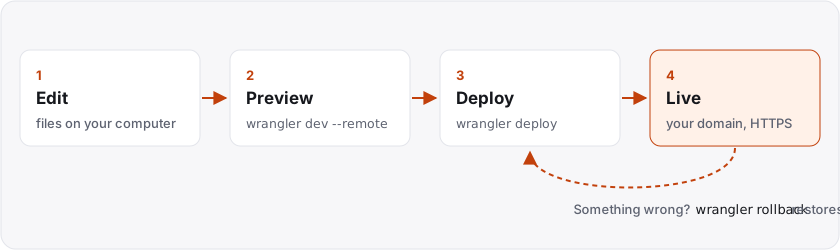
npx wrangler devThis runs the site on your computer. Add --remote to run it on Cloudflare's network against your real storage, which is the closest thing to the live site.
4. Deploy
npx wrangler deployYour site is live at a free *.workers.dev address within seconds. Every deploy is kept as a version.
5. Add a database
D1 is Cloudflare's SQLite database, and the free plan is plenty for a new site.
npx wrangler d1 create my-dbCopy the snippet it prints into wrangler.jsonc, then keep your tables in numbered files in a migrations/ folder and apply them with:
npx wrangler d1 migrations apply my-db --remoteTip: apply database changes before deploying code that needs them, and check they succeeded. Otherwise the new code can briefly run against the old tables.
6. Use your own domain
Add your domain to the Worker in wrangler.jsonc:
"routes": [{ "pattern": "example.com", "custom_domain": true }]Deploy again. Cloudflare creates the DNS record and the HTTPS certificate for you.
Day-to-day commands
npx wrangler deployputs changes livenpx wrangler tailstreams live logsnpx wrangler rollbackrestores the previous version if something goes wrong
Keep your project in one clearly named folder and back it up. If you don't use Git, that folder is your master copy.
Read more in the Cloudflare Workers documentation.