Add privacy-friendly analytics with Cloudflare Web Analytics
See your visitors, top pages and page speed without cookies or a consent banner. Free, and set up in about five minutes.
Cloudflare Web Analytics shows how many people visit your site, which pages they read, where they come from and how fast your pages load. It's free, and it doesn't use cookies or track people across sites.
What you'll see
- Visits and page views over time
- Your most-read pages
- Where visitors come from (referrers) and which countries
- Devices and browsers
- Page load speed, including Core Web Vitals
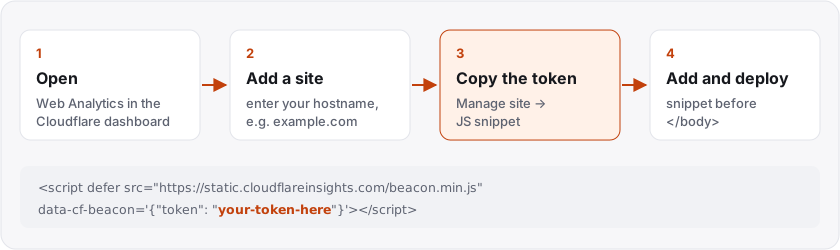
1. Open Web Analytics
Log in to the Cloudflare dashboard and open Web Analytics. You can find it in the sidebar, or search for it at the top of the dashboard.
2. Add your site
Select Add a site and enter your site's hostname, for example example.com.
- If your domain already runs through Cloudflare, pick it from the list. Cloudflare can then switch on analytics for you automatically, with no code needed.
- If it doesn't, type the hostname in yourself. You'll add a small snippet to your pages in step 4.
3. Copy the snippet and token
Open Manage site for your new entry. You'll see a JavaScript snippet that looks like this:
<script defer src="https://static.cloudflareinsights.com/beacon.min.js"
        data-cf-beacon='{"token": "your-token-here"}'></script>
The token is the long string of letters and numbers after "token":. It's not a secret, because it appears in your page's source for anyone to see.
4. Add it to your pages and deploy
Paste the snippet just before the closing </body> tag on every page, usually in a shared layout or template, then deploy.
If your site has a settings page with an analytics field, as BootApp's admin area does, you only need to paste the token there, and the site adds the snippet for you.
Use one method, not both. If you switch on automatic set-up and add the snippet yourself, page views can be counted twice. In Manage site, you can choose which method the site uses.
Check it's working
Visit your site and click around a few pages, then go back to Web Analytics. Data usually appears within a few minutes.
If nothing shows up:
- Check the snippet is on the page: view the page source and search for
cloudflareinsights. - Turn off ad blockers for your test, because some block analytics scripts.
- Make sure you added the right hostname, with or without
www.
Good to know
Because Cloudflare Web Analytics doesn't use cookies or store data in the visitor's browser, many sites run it without a cookie consent banner. Check what applies to your own site and region.
Read more in the Cloudflare Web Analytics documentation.